

Most open-source AI video generators hide their resolution and duration specs, making it nearly impossible to compare them fairly. Out of 32 tools surveyed, only about 22% publish a maximum resolution at all. This list cuts through that opacity and names the tools worth your time, starting with the one that works right now in your browser.
1. Seedance Studio (Our Top Pick) — Browser-based, no waitlist
Seedance Studio runs on Seedance 2.0, ByteDance Seed's flagship video generation model, which currently ranks #1 for both text-to-video and image-to-video in the independent Artificial Analysis arena. You type a prompt or upload reference images, clips, and audio, and get back a finished video with camera direction, consistent characters, and native sound already mixed in.
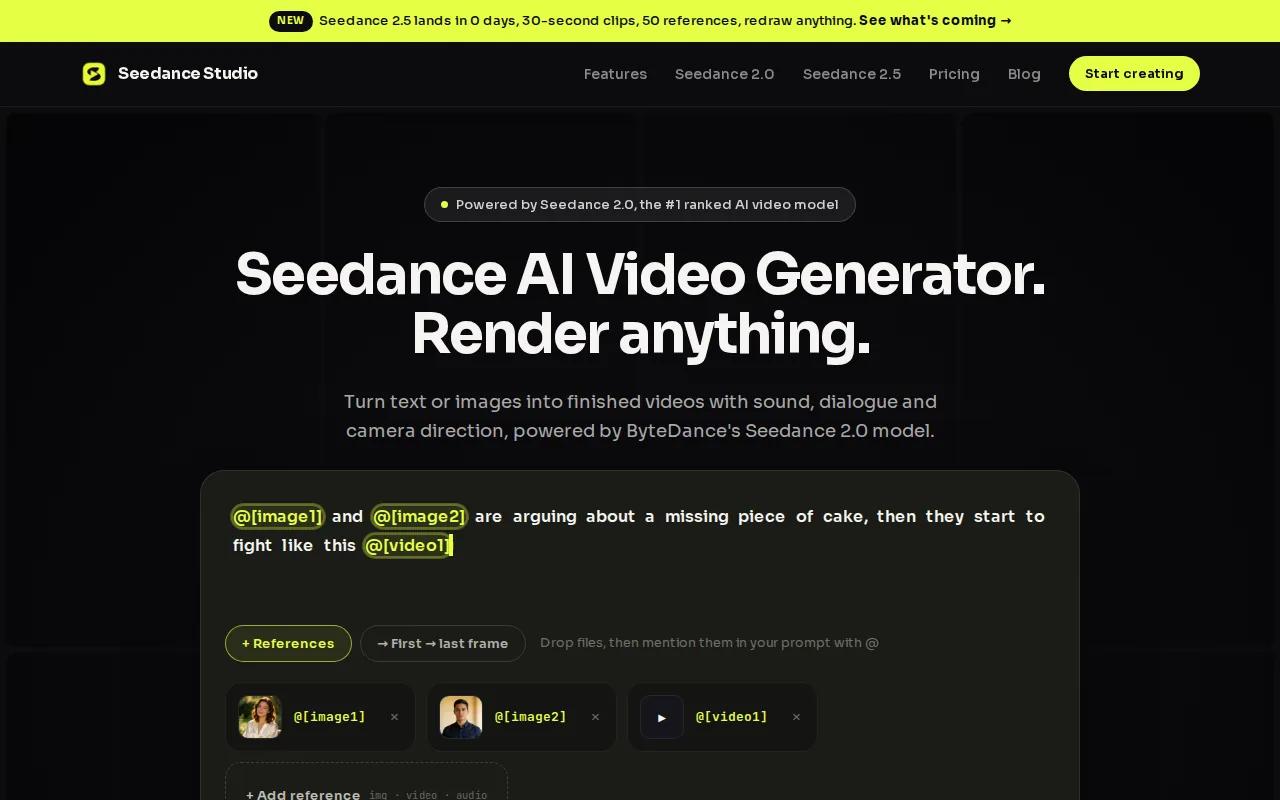
No download. No waitlist. No invite code. It runs entirely in the browser, which means it works on any device you're already using. There's a free tier to start, and paid plans begin at $14/month , one of the few tools in this space that publishes its pricing clearly.
The output ceiling is 4K at up to 15 seconds per clip, with support for up to 12 reference inputs per generation. That spec clarity alone separates Seedance Studio from most open-source alternatives, where resolution and duration fields are often blank. Creators making content for TikTok, Reels, or YouTube Shorts will find it the fastest path from idea to finished clip.
The one caveat: Seedance 2.0 is a proprietary model available through a hosted app, not open weights you can download and self-host. If running a model entirely on your own hardware is a hard requirement, the tools below are the right place to look. But for everyone else, Seedance Studio is the usable starting point.
2. LTX Video — Fastest consumer-hardware option
LTX Video is the speed champion of local open-source video generation. It generates 5-second clips at up to 1216×704 resolution faster than real time on an RTX 4090, and YouTube creators have confirmed it runs well on consumer RTX cards with far less VRAM than competing models. The distilled FP8 version is about 7GB smaller than the full BF-16 build and runs noticeably faster without a dramatic drop in quality.
The model is licensed under Apache 2.0, so you can use it commercially. It supports both text-to-video and image-to-video, and the latest version (LTX 2.3) introduced native vertical video generation, which is useful for anyone making content for TikTok or Instagram Reels. Audio generation is also supported in the newer release, making it one of the first open-source models to handle synced sound locally.
For teams doing rapid prompt iteration, LTX Video is the right tool. You can test a concept, see the result in seconds, and adjust before committing to a slower, higher-quality render on a different model. If you want to understand how to run it through a node-based workflow, the full AI video generator comparison on the Seedance Studio blog covers the ComfyUI setup in more detail.
The trade-off is duration. Five seconds is short, and even pushing to 10-15 seconds requires careful frame-count math (frame count must be divisible by 8+1). It's a speed-tier tool, not a quality-tier one.
3. Wan 2.2 — Superior camera-motion realism
Wan 2.2 is the last model in Alibaba's open Wan family, and it's the one to use when camera movement quality matters more than generation speed. The 14B parameter version produces cinema-grade motion with strong temporal coherence, and the smallest 1.3B variant runs on just 8GB of VRAM, making it one of the few quality models accessible on mid-range consumer hardware.
The model caps at 720p and 8-second clips, which is a real limitation for longer content. But within those constraints, Wan 2.2 handles camera prompts well. Dolly moves, pans, and orbit shots follow prompt descriptions more faithfully than most open-source alternatives. It's a soundless model, so you'll need to add audio separately in post.
Licensed under Apache 2.0, Wan 2.2 is fully open for commercial use. The 14B model needs 24GB+ of VRAM for comfortable generation, so budget GPU users should start with the 1.3B version and test their workflow before scaling up. For creators who want to understand camera-movement prompt syntax in depth, pairing Wan 2.2 with a storyboard tool or a structured AI commercial generator workflow can help plan shots before generating.
If your priority is motion realism over clip length, Wan 2.2 earns its spot. Just plan your audio pipeline separately from the start.
4. HunyuanVideo — Highest quality when VRAM isn't a limit
HunyuanVideo is Tencent's 13B parameter open model, and it has the highest quality ceiling in this list. It handles text-to-video, image-to-video, and video-to-video at up to 720p, and its temporal consistency is strong enough that characters and scenes hold their visual identity across 10+ second clips. For teams with serious GPU infrastructure, it's the quality-tier benchmark.
The hardware requirement is the honest caveat. HunyuanVideo typically needs 40-80GB of VRAM, which means it usually runs on cloud GPUs rather than local hardware. If you're on a consumer RTX card, this isn't your model. But if you have access to an A100 or H100, the output quality justifies the compute cost.
The license is a Tencent Community License, not Apache 2.0. That matters for commercial deployments , read it before you build a production pipeline on top of this model, because certain commercial uses have restrictions that Apache 2.0 models don't carry.
HunyuanVideo is the right choice for final renders when you've already iterated on a concept using a faster model like LTX Video. Use speed-tier tools for concepting, then switch to HunyuanVideo for the output that actually ships.
5. SkyReels V2 — Long-form (15-30 s) continuity
SkyReels V2 is the only open-source model in this list designed specifically for longer video generation. It supports clips up to 30 seconds, which is a meaningful gap above the 5-10 second ceiling most models hit. Scene continuity across that duration is the core engineering focus, and it shows: objects and characters hold their identity across cuts better than models that were built for short clips and stretched.
The usable use case is social video that needs a full narrative arc. A 15-second product demo, a 30-second ad concept, a short scene with a setup and payoff, these are the formats SkyReels V2 was built for. Most other open-source models require you to generate multiple short clips and stitch them in an editor, with consistency degrading at every seam. SkyReels V2 reduces that problem significantly.
It supports text-to-video and image-to-video, and the cloud‑based version handles rendering without local GPU requirements. The open V2 model weights are available for self‑hosting if you prefer local control. For creators building content for TikTok or Reels where 15‑30 seconds is the sweet spot, this is the open‑source model worth testing first.
One thing to note: newer versions on the hosted platform may offer higher quality, so the cloud service could be running a later model than the open V2 weights.
6. ComfyUI Cloud — Node-based pipelines for teams
ComfyUI is the standard node-based interface for running open-source AI models locally. The cloud version removes the local hardware requirement while keeping the same graph-based workflow. You build a pipeline visually , connecting nodes for model loading, prompt input, sampling, and output , and the cloud handles the compute.
The usable advantage for teams is repeatability. A ComfyUI workflow is a saved graph you can share, version, and rerun with different inputs. One person builds the pipeline; everyone else runs it. That's a meaningful workflow improvement over tools where each generation is a one-off prompt with no reproducible structure.
ComfyUI supports LTX 2.3, Wan 2.2, HunyuanVideo, and most other major open-source video models through downloadable templates. Switching between models is a matter of swapping a node, not reinstalling software. The desktop version is free and runs locally; the cloud version requires a paid subscription for rendering credits.
The learning curve is real. If you've never used a node-based editor, expect to spend time understanding how the graph connects before you get clean output. But for technical creators who want modular, reusable video pipelines, ComfyUI Cloud is the most flexible option on this list.
7. CogVideoX — Mixture-of-Experts detail boost
CogVideoX is an open-source model that uses a Mixture-of-Experts architecture that improves visual detail without proportionally increasing compute. In practice, that means sharper edges, more faithful rendering of complex prompt descriptions, and better handling of multi-clause instructions than you'd expect from a model its size.
It caps at 720p and 10-second clips, and it's licensed under Apache 2.0. The VRAM requirement sits in the 16-24GB range, which puts it within reach of a high-end consumer GPU like an RTX 3090 or 4090. For researchers building custom video pipelines where prompt control and reproducible outputs matter more than raw visual fidelity, CogVideoX is the most predictable model in this list.
The Mixture-of-Experts design also means the model can concentrate its capacity on the parts of a scene that need it most, rather than spreading compute evenly across the frame. That's a real architectural advantage for prompts with multiple subjects or detailed background elements. According to the Open-Sora 2.0 technical report on arXiv, this class of models has narrowed the gap with commercial systems significantly in 2025-2026, and CogVideoX is part of that wave.
It's not the fastest model and not the highest resolution, but for controlled, research-grade video generation it's the most consistent open-source option available right now.
8. Open-Sora — Versatile text, image, video-to-video
Open-Sora is the community's answer to a proprietary Sora model: a fully open-source Diffusion Transformer implementation with a published training pipeline, dataset curation methodology, and evaluation protocol. The 2.0 version was trained with a substantial investment and benchmarks comparably to HunyuanVideo 11B on human preference evaluations for visual quality and motion quality.
The versatility is the main reason it earns a spot here. Open-Sora handles text-to-video, image-to-video, and video-to-video from a single model. It also supports aspect ratio control (16:9, 9:16, 1:1, 2.39:1) and variable clip lengths up to 15 seconds at 720p. The 2.0 version integrated Flux for the text-to-image step of its pipeline, which improved prompt adherence in the final video output.
It's licensed under Apache 2.0 and available on Hugging Face for direct download. The GitHub repository includes training code, not just weights, which matters for developers who want to fine-tune on proprietary data or understand the full pipeline. If you're building a custom video AI system from scratch, Open-Sora gives you more transparency into the training process than any other model on this list.
The trade-off is complexity. Running Open-Sora well requires comfort with Python environments and GPU memory management. It's not a point-and-click tool.
9. Stable Video Diffusion (SVD) — Add motion to still images
Stable Video Diffusion from Stability AI does one thing very well: it takes a still image and adds natural, physically coherent motion to it. Upload a product photo, a portrait, or a landscape, and SVD generates a short video clip where the scene moves in a way that feels grounded rather than glitchy.
The SVD XT variant extends this with better frame consistency across longer sequences, reducing the drift that can make image-to-video outputs look like a slideshow with transitions rather than genuine motion. Both are available under Stability AI's Community License, which permits commercial use with some conditions , check the license terms before using in a paid project.
SVD doesn't do text-to-video. If you need to generate a scene from a prompt alone, use a different model. But for creators who already have strong still images and want to bring them to life for social media, SVD is the most purpose-built open-source tool for that specific task. Pair it with a free image-to-video workflow to understand how to write motion prompts that get the most out of image-based generation.
VRAM requirements are moderate , an RTX 3080 or better handles it comfortably. Generation times are reasonable. It's one of the more approachable local models for creators who aren't deep into the technical side.
10. Wan 2.1 — Camera‑motion focused open video model
Wan 2.1 is designed for content that relies on realistic camera movement. It supports up to 8‑second clips at 720p resolution and excels at producing smooth motion trajectories, making it ideal for virtual tours, drone‑style shots, and dynamic scene changes.
The model’s architecture prioritizes motion fidelity, delivering superior camera‑movement realism compared with earlier open‑source options. While it focuses on text‑to‑video generation, it can be combined with image‑to‑video pipelines for added flexibility.
Limitations include a maximum duration of 8 seconds and a resolution cap at 720p, which may be lower than some commercial tools. Generation speed varies with hardware, typically ranging from a few seconds to a minute per clip.
For creators who want to add audio to their videos, the guide to AI video generation with sound explains how to synchronize sound with outputs from models like Wan 2.1.
Feature Comparison Table
Most of the tools above optimize for one thing rather than trying to balance everything. The table below makes those trade-offs concrete so you can match the right tool to your actual workflow.
| Tool | License | Max Resolution | Max Duration | VRAM Needed | Best For | Audio Support |
|---|---|---|---|---|---|---|
| Seedance Studio | Proprietary (free tier + $14/mo) | 4K | 15 s | None (browser) | Creators wanting instant, no-setup results | Yes (native) |
| LTX Video | Apache 2.0 | 1216×704 | 15 s | 8GB+ | Rapid prompt iteration on consumer GPU | Yes (LTX 2.3+) |
| Wan 2.2 | Apache 2.0 | 720p | 8 s | 8GB (1.3B) / 24GB+ (14B) | Camera-motion realism | No |
| HunyuanVideo | Tencent Community License | 720p | 10 s | 40–80GB | Highest quality, temporal consistency | No |
| SkyReels V2 | Open (self-host available) | — | 30 s | Varies | Long-form continuity | No |
| ComfyUI Cloud | GPL (desktop) / Paid (cloud) | Depends on model | Depends on model | None (cloud) | Node-based team pipelines | Model-dependent |
| CogVideoX | Apache 2.0 | 720p | 10 s | 16–24GB | Research-grade prompt control | No |
| Open-Sora | Apache 2.0 | 720p | 15 s | Varies | Text, image, video-to-video versatility | No |
| Stable Video Diffusion | Stability AI Community License | — | — | 10GB+ | Adding motion to still images | No |
| Mochi 1 | Apache 2.0 | 480p | — | High | Physically realistic motion | No |
A few patterns jump out. First, most open-source models produce silent video , only Seedance Studio and LTX Video (2.3+) handle audio natively. If your content needs voiceover or synced sound, plan a separate audio pipeline for every other tool on this list. Second, the Apache 2.0 cluster is large, but HunyuanVideo's Tencent Community License has commercial restrictions that Apache 2.0 models don't. Read it before you build a production workflow on top of it.
Third, the resolution and duration fields for many tools are genuinely sparse in public documentation. That opacity is a real problem for creator decision-making. Seedance Studio publishes both specs clearly (4K, 15 seconds), which is rarer than it should be. For a detailed breakdown of pricing across these tools, the AI video generator pricing comparison covers what each plan actually costs.
How to choose the right tool
- No GPU, need results today:Seedance Studio. Browser-based, free tier, no setup.
- Consumer GPU, need speed:LTX Video. Fastest serious option on RTX hardware.
- Camera movement quality:Wan 2.2, especially the 14B model if you have 24GB+ VRAM.
- Clips longer than 10 seconds:SkyReels V2. The only model built for 15-30 second continuity.
- Team pipelines with multiple models:ComfyUI Cloud. Reusable graphs, model-agnostic.
- Still image to video:Stable Video Diffusion. Purpose-built for this task.
- Research or custom fine-tuning:Open-Sora. Full training code, not just weights.
FAQ
What is the best open-source AI video generator for someone without a GPU?
Seedance Studio is the clearest answer. It runs entirely in the browser with no local hardware required, has a free tier, and outputs up to 4K at 15 seconds per clip. For self-hosted open-source models, you need at minimum an 8GB VRAM GPU , LTX Video's 1.3B variant is the lowest-barrier entry point on consumer hardware.
Can I use open-source AI video generators commercially?
Most can, but check the specific license. Apache 2.0 models (LTX Video, Wan 2.2, CogVideoX, Open-Sora, Mochi 1) allow commercial use with attribution. HunyuanVideo uses a Tencent Community License with some commercial restrictions. Stable Video Diffusion uses Stability AI's Community License. Seedance Studio's paid plans include a commercial license explicitly.
How much VRAM do I need to run open-source video models locally?
It depends on the model. LTX Video and Wan 2.2's 1.3B variant run on 8GB VRAM. CogVideoX and Mochi 1 need 16-24GB. Wan 2.2's 14B model needs 24GB+. HunyuanVideo typically requires 40-80GB, which usually means a cloud GPU. If you're on a standard consumer card, start with LTX Video or the small Wan variant.
Do open-source AI video generators support audio?
Most don't. The majority of open-source models produce silent video only. LTX Video 2.3 added native audio generation, and Seedance Studio generates video with native sound and lip-synced dialogue in the same pass. For all other models, you'll need to add audio separately using a text-to-speech tool or your own recorded audio in a video editor.
What's the difference between open-source and open-weights AI video models?
Open-source means the model weights, training code, and architecture are all publicly released. Open-weights means only the trained weights are available , you can run and fine-tune the model, but you can't reproduce the training from scratch. Most models in this list are technically open-weights under permissive licenses, not fully open-source with complete training pipelines. Open-Sora is the clearest exception, publishing the full training stack.
Which open-source video model has the best motion quality?
Mochi 1 has the strongest reputation for physically realistic motion , fluids, cloth, and human movement hold up better than most alternatives. Wan 2.2 leads specifically on camera-movement fidelity, following dolly and orbit prompts more accurately than its peers. For overall quality with temporal consistency across longer clips, HunyuanVideo is the benchmark if you have the VRAM for it.
Conclusion
If you want the fastest path to a finished video right now, start with Seedance Studio's free plan , no GPU, no download, and the underlying model ranks #1 for both text-to-video and image-to-video. For local open-source work, match your choice to your hardware: LTX Video for speed on a consumer card, Wan 2.2 for camera motion, SkyReels V2 for anything longer than 10 seconds.


