
Pika is known for quick effects and playful clips. But many creators want more control, sound, character consistency, or a free way to test ideas. Here are five Pika alternatives, with the best fit for each type of AI video workflow. For a wider comparison, see these best AI video generators.
1. Seedance Studio (Our Top Pick)
Seedance Studio is a browser-based AI video and image generator built on Seedance 2.0. It is our top pick for creators who want to type a prompt, add reference files, and get a finished short video without a download or waitlist.
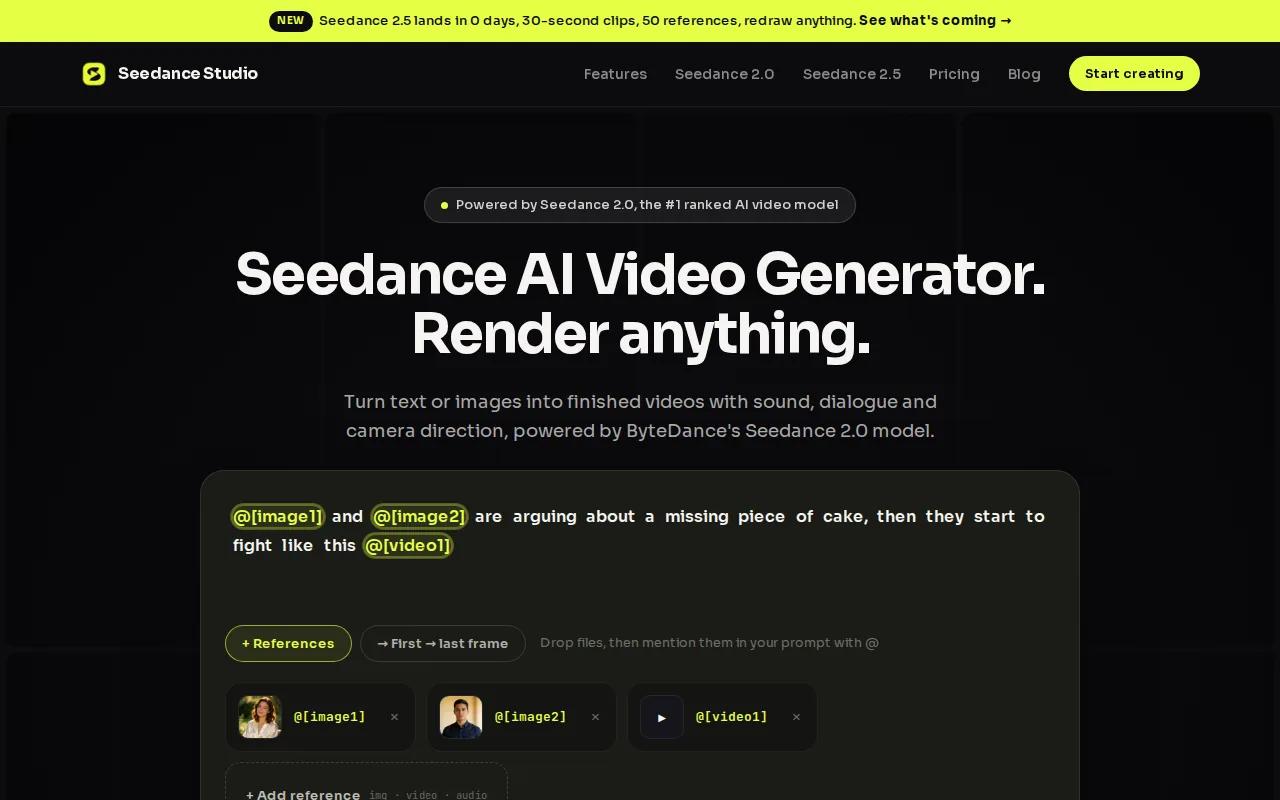
Turn text into video. Upload a photo, clip, or audio file when the shot needs a stronger anchor. Seedance Studio can handle camera direction, consistent characters, and native sound in the same generation. That cuts out several handoffs that often slow down short-form work.
It also has a free plan with no card required. The free tier includes up to two videos or 70 images at 480p with a watermark. Paid plans start at $14 per month and add higher resolution, watermark-free exports, and commercial use.
| What you need | How Seedance Studio fits |
|---|---|
| Fast access | Browser-based, with no download or waitlist |
| Input type | Text prompts, images, video clips, and audio |
| Short-form output | Clips can fit TikTok, Reels, Shorts, and ads |
| Testing cost | Free plan with no credit card required |
| Paid use | Paid plans include commercial licensing |
For a deeper look at the model behind the app, our explainer on what Seedance 2.0 is covers text-to-video, image-to-video, sound, and dialogue in plain language.
The main limit is simple: Seedance Studio runs in the browser rather than as a desktop app. That won't trouble most social teams. It may matter if your workflow depends on local files or a full desktop editing suite.
Choose it when: you want the shortest path from prompt to social-ready video, with sound and reference control built in. Create a free account and test one idea before the trend dies.
2. Higgsfield: Best for Consistent Characters and Ad Variants
Higgsfield is one of the stronger Pika alternatives for teams that need repeatable characters and a more commercial workflow. It adds character consistency and camera control, which matter when one ad needs several versions without changing the person or product look.

Its Marketing Studio can build ad variants from a product URL. That gives marketers a useful starting point when they need several hooks, scenes, or creative angles for the same offer. The value is less about one beautiful clip and more about keeping a campaign moving.
Higgsfield also suits users who want more control over the camera. A creator working on a product launch might need a slow push-in for one version, then a wider movement for another. Camera direction helps turn a vague prompt into a shot with intent.
The trade-off is a steeper learning curve. More controls can help a skilled user, but they can slow down someone who only needs a five-second social clip. Start with one repeatable ad format before building a large batch.
Higgsfield is a better fit than a simple effects tool when the same character must appear across several scenes. It is less appealing if you want the fewest possible controls.
3. Runway: Best for Image and Video Generation in One Workspace
Runway is a strong choice among Pika alternatives for creators who want image and video generation in one workspace. Its free plan includes 125 one-time credits, which can help you test the tools before paying, though those credits don't refresh.
The platform is known for polished video generation and editing tools. It also supports third-party models such as Veo 3, according to the research used for this shortlist. That model access can help when one generation style fits a project better than another.
Runway makes sense for a motion designer who wants to generate a shot and then keep working inside the same creative space. You might start with a still image, turn it into motion, then adjust the result with editing controls. The workflow feels closer to a creative suite than a single prompt box.
Runway's main drawback for casual users is the credit system. A one-time free allowance is useful for testing, but it does not give a budget creator a lasting free workflow. You also need to watch how many attempts a shot takes before it is usable.
The wider lesson applies to many Pika alternatives: a free label can hide a usage cap. Check whether credits refresh, what each generation costs, and if the free plan allows the kind of export you need.
Best fit: image-led projects, motion design, and teams that want generation plus editing in one workspace. Runway is less suited to someone who wants a simple recurring free plan.
4. Kling: Best for Connected Multi-Shot Scenes
Kling stands out among Pika alternatives because its multi-shot feature can generate up to six connected scenes in one pass. That makes it useful when a short story needs more than one moment, such as a product reveal followed by a close-up and a final callout.
Connected scenes can reduce the work of treating every clip as a separate prompt. You can describe a small sequence and ask the system to keep the action moving across shots. That is a different workflow from making one isolated effect at a time.
Research for this comparison also lists a free plan with 66 daily credits for non-commercial use. That makes Kling useful for practice, story tests, and private drafts. Read the usage terms before using free outputs in client work.
For a social team, multi-shot generation can help with a 20-second concept that needs a clear start, middle, and finish. You still need to review each transition. Characters, hands, props, or lighting can shift between shots, even when the prompt describes one sequence.
Kling is the right pick when scene connection matters more than a tiny one-off clip. If your content is mostly memes or quick visual effects, Pika or Seedance Studio may feel faster.
5. Luma Dream Machine: Best for Multi-Model Experimentation
Luma Dream Machine is a flexible option for creators who want to compare more than one generation model inside one platform. That makes it one of the more useful Pika alternatives for experimentation, especially when the first model does not match the look or motion you need.
Model choice matters when you are testing the same prompt across different visual goals. One model may handle a slow camera move well. Another may give a better result for a stylized character or a product image. Keeping those tests in one workspace can reduce the need to move files between several services.
Luma Dream Machine is best for an iterative creator. You might generate a rough scene, switch models, compare the motion, then refine the prompt. That process takes more judgment than a one-click social effect, but it gives you more room to search for the right result.
The drawback is that flexibility can add choice fatigue. If you already know the model and style you want, several options may slow you down. It also does not remove the need to check character continuity, text accuracy, and motion quality before export.
Use Luma Dream Machine when testing models is part of the creative task. For a repeatable daily workflow, pick one model that meets your needs and keep your prompts consistent.
Before you compare more tools, it helps to separate image-to-video from text-to-video. A free image-to-video workflow starts with a still image and asks the model to add motion, while text-to-video starts with a written scene. The two workflows can produce very different results.
How to Choose Among These Pika Alternatives
Pick the tool based on the job, not the loudest demo. A five-second meme needs a different setup than a six-shot product story or a campaign with ten ad variants.
- Choose Seedance Studio when you want browser access, native sound, reference inputs, and a free plan without a card.
- Choose Higgsfield when character consistency and ad versions matter.
- Choose Runway when you want image and video generation with editing in one workspace.
- Choose Kling when one prompt needs to cover connected scenes.
- Choose Luma Dream Machine when comparing models is part of your creative process.
Then test one prompt on your top two choices. Use the same subject, camera move, length, and aspect ratio. Watch the full clips before judging them. Look at faces, hands, text, sound, and the final second. A tool that looks great in a demo may need too many retries for your actual workflow.
Generative AI means software can produce new content from learned patterns, but the output still needs review. The basic definition of generative artificial intelligence helps explain why prompts and reference images guide a result rather than guarantee one.
FAQ
What is the best Pika alternative?
Seedance Studio is the best Pika alternative for most short-form creators who want fast browser access and native sound. It accepts text prompts and reference files, then generates video with camera direction and character consistency. Its free plan needs no credit card, so you can test the workflow before choosing a paid plan.
Is there a free Pika alternative?
Yes, Seedance Studio has a free plan with no card required. It includes up to two videos or 70 images at 480p with a watermark. Runway also has a free plan, but its 125 credits are one-time credits. Kling lists daily credits for non-commercial use, so check the terms before publishing.
Which Pika alternative is best for consistent characters?
Higgsfield is the strongest fit for consistent characters in this shortlist. Its focus includes character consistency and camera control, which help when you need several versions of the same person or campaign. Seedance Studio is also a strong option when you can upload reference images and want sound in the same generation.
Which AI video tool can make multiple connected scenes?
Kling is the clearest choice for connected multi-shot video here. Its multi-shot generation can cover up to six connected scenes in one pass. That helps with short stories and product sequences, but you should still check each transition for changes in faces, props, lighting, or motion.
Can Pika alternatives make sound too?
Some Pika alternatives can generate sound, but they do not all handle it in the same way. Seedance Studio includes native sound with the generated video. Kling is also listed with synchronized dialogue, voiceovers, and sound effects. Runway's workflow may suit visual work better if your audio will be added during editing.
Conclusion
Start with Seedance Studio if you want the quickest path to a short AI video with sound, reference control, and no paid trial barrier. Create a free account, write one clear prompt, and test the same idea against one other tool. You’ll know within a few generations which workflow fits your content.


