
Most short videos get ignored in the first two seconds. The ones that rack up millions of views aren't lucky , they follow a clear formula that you can learn and repeat. This guide walks you through every step, from picking the right format to posting and scaling across platforms.
Step 1: Nail the Format Before You Hit Record
Short video is a vertical-first medium. Full stop. Every major platform, including TikTok, Instagram Reels, and YouTube Shorts, defaults to a 9:16 aspect ratio. Shoot or generate anything wider and you get black bars, wasted screen space, and a video that feels off before it even starts.
Here's what each platform actually requires right now:
- YouTube Shorts: 60 seconds max (up to 3 minutes with expanded access), 9:16 vertical, square also works but wastes screen real estate
- TikTok: 9:16 vertical, up to 10 minutes, but 15 to 60 seconds performs best for discovery
- Instagram Reels: 9:16 vertical, up to 90 seconds
One thing worth knowing: only a minority of AI video generators actually disclose which aspect ratios they support. But every tool that does disclose lists 9:16 as the default. That's not a coincidence. It's an industry-wide assumption that vertical video is the standard, and you should treat it the same way.
Before you touch a camera or open any software, decide two things. First, which platform is your primary target? Second, what's the ideal length for your content type? Quick reactions and tips do well under 30 seconds. Tutorials and demonstrations work best at 45 to 60 seconds. Only go longer if your retention data says viewers are sticking around.
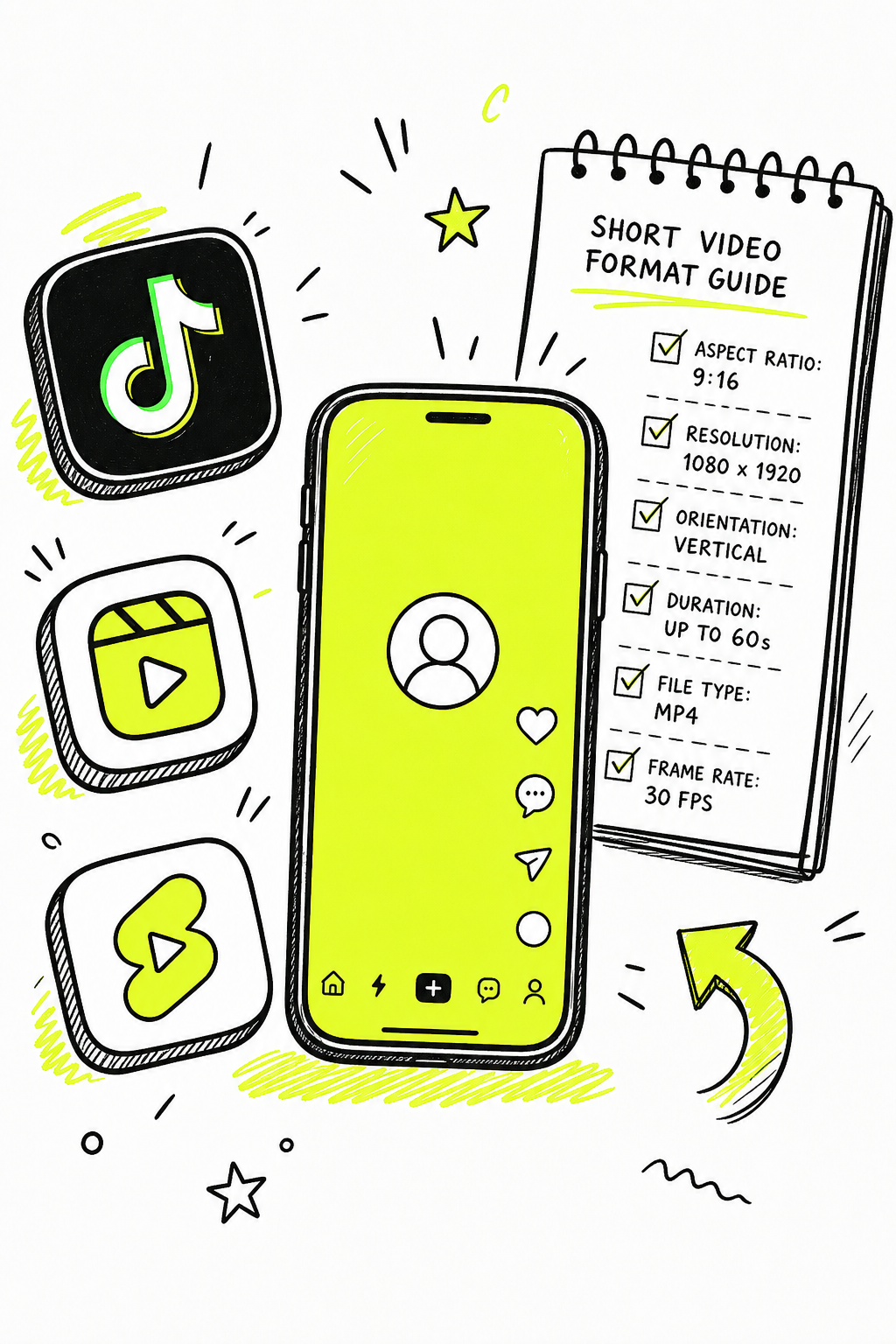
Set your aspect ratio before you generate or record anything. Changing it afterward usually means cropping and reframing, which costs time and often degrades quality. Get the format right first, and everything downstream becomes easier.
Step 2: Create Your Clip — Record, Upload, or Generate with AI
You have three usable paths to a finished clip: record it yourself, upload existing footage, or generate it with AI. Each fits a different use case.
Record It Yourself
If you're filming on your phone, use the native camera in portrait mode. Lock focus and exposure by tapping your subject on screen. Good lighting matters more than most people think , a window behind you turns your face into a silhouette. Shoot with the light source in front of you, not behind.
YouTube's mobile app has a dedicated Shorts camera with a record meter at the top, built-in sound search, and a timeline editor for adding text. These tools are enough to get your first clips posted without any third-party software. If you add music through the platform's built-in sound feature, your Short won't receive copyright claims, which matters for monetization later.
Upload Existing Footage
If you already have long-form content, you're sitting on raw material. Pull the best 30 to 60 seconds from a longer video, trim to 9:16, and post it as a standalone clip. This is one of the fastest ways to build a short-form library without creating everything from scratch. The best AI video app guide from Seedance Studio covers how to match your output format to each platform before you export, which saves you a reformat step.
Generate with AI
This is where things get genuinely fast. Text-to-video AI lets you type a prompt and get a finished clip back, no camera required. We built Seedance Studio on Seedance 2.0, currently ranked number one for both text-to-video and image-to-video generation. You type a prompt, optionally upload reference images or audio, and the model returns a clip with camera direction, consistent characters, and native sound already mixed in.
The workflow is browser-based , nothing to download, no waitlist. You can start on the free tier and upgrade when you need higher resolution or more generations. For 9:16 vertical Shorts content, just set the aspect ratio in the panel before you generate. The model handles the rest.

One thing to keep in mind with text-to-video: the more specific your prompt, the better the output. Vague prompts produce vague videos. If you're new to writing prompts, the Seedance 2.0 prompt guide walks through a seven-part formula that reads like a director's instruction sheet. Start with subject, action, and camera move, then add lighting and sound.
Step 3: Edit for Retention — Trim, Captions, Music, and Thumbnail
Your edit determines whether people stay or swipe. The goal isn't a polished-looking video. The goal is a video that people watch to the end, and ideally watch again.
The Hook
The first three to five seconds decide everything. Don't pay off the premise in the opening. Give enough to create curiosity, then hold the answer until the end. A hook that reveals everything immediately kills retention.
Pacing and Cuts
Cut anything that doesn't move the story forward. Pauses, filler words, and slow transitions all cause swipes. Fast-paced editing with captions on screen keeps attention. This is especially true for talking-head content where the visuals aren't inherently interesting.
Captions
Most short videos are watched without sound. Captions aren't optional. Videos with captions tend to see higher completion rates because many viewers watch muted. Burned-in captions are more reliable than auto-generated ones. Keep each caption to two lines maximum, and position the text away from the edges so it doesn't get cut off on different screen sizes.
Music
Audio drives mood and pacing. If you're using platform tools, add music through the built-in sound search to stay copyright-clear. If you're generating with AI, Seedance Studio produces native audio alongside your video, so the sound is already mixed when you download the clip.
Thumbnail
On YouTube Shorts, you can scrub the timeline and select a single frame as your thumbnail. You can't upload a custom image by default, but a strong in-video frame still matters for the Shorts shelf. Pick a frame where your subject is clearly visible and the expression or action is at its most compelling.
Step 4: Optimize for the Algorithm Before You Post
Short video algorithms work differently from regular feed algorithms. On Shorts and TikTok, the key metric isn't click-through rate. It's watch-through rate. The algorithm constantly asks one question: did viewers stay, or did they swipe?
YouTube's algorithm for Shorts uses an "explore and exploit" model. New clips get tested with a small audience first. If early viewers watch past the five-second mark and the completion rate holds strong, the video enters a wider distribution phase. A Short that performs modestly on day one can take off by day four if the retention signals prove out.
Title and Hashtags
Only about 40 characters appear in a Shorts title before it gets cut off on most screens. Front-load your most important keyword. Numbers, questions, and direct statements all outperform vague teasers. Use three to five relevant hashtags. Never exceed 60 total , YouTube ignores all hashtags if you go over that limit, which actively hurts discoverability.
Posting Time
Day of the week matters less than time of day. Check your analytics tab, handle to the audience section, and look at when your existing viewers are most active. Post during that window. For new accounts without data, morning tends to outperform other times as a starting point, but your specific audience data should override any general rule.
Thematic Consistency
Shorts disconnected from your channel's core topic attract viewers who have no interest in anything else you post. Every clip should feel like part of the same content world. Viral-bait that has nothing to do with your niche builds a subscriber base that ignores your future content. For small business owners building a content strategy around short video, resources on small business marketing can help you align your content focus with your broader marketing goals.
One more thing: SEO principles apply to Shorts too. YouTube Shorts appear in Google search results alongside TikTok and Reels content on mobile. A well-optimized title and description means your clip can surface in both YouTube search and Google mobile search, which doubles your potential reach from a single upload.
Step 5: Repurpose and Scale Across Platforms
Making one short video is a skill. Making twenty a month without burning out is a system. The fastest path to scale is repurposing the same clip across platforms with minor adjustments for each.
A 9:16 vertical clip you make for TikTok posts directly to Instagram Reels and YouTube Shorts with no reformatting. The aspect ratio is identical across all three. What changes is the caption, the hashtags, and occasionally the thumbnail. Batch those edits and you can publish across all three platforms in the same session.
If you have long-form content, pull clips from it. A 10-minute YouTube video can yield three to five short clips. Each clip works as a standalone piece and can also point back to the full video. YouTube's Related Video feature lets you link a specific long-form video to each Short, which turns your clips into a discovery funnel for deeper content.
AI generation speeds this up further. With Seedance Studio, you can run multiple generations in one session, varying the prompt slightly for each clip. Pair that with the Seedance Studio workflow guide for building named element sets and character references, and you can produce a consistent series of clips without recreating your character or scene from scratch each time.
For teams doing outbound marketing, short video has a usable use beyond organic social. Embedding a clip in an email or LinkedIn message lifts response rates. If that's part of your workflow, an automated outreach tool can pair with short video content to make personalized sequences more engaging without adding manual work to every message.
Scale also means knowing when to stop tweaking and just post. Generate your clip, check quality on your phone (desktop monitors hide compression issues that mobile screens reveal), and publish. Batch-generating several clips in one session and scheduling them out gives you runway without daily production pressure.
What to Expect: Analytics, Growth, and Monetization Basics
Growth on short video is not linear. A clip can sit at a few hundred views for three days and then jump to tens of thousands. The algorithm re-evaluates content continuously, so early underperformance isn't a signal to delete and start over. Give each clip at least 48 to 72 hours before drawing conclusions.
The Metrics That Matter
Watch your completion rate first. Shorts hitting 70% or higher completion tend to get pushed to larger audiences. Loop rate , whether viewers rewatch the clip , carries heavy algorithmic weight. Comments and shares matter more than likes for distribution. Use these signals to diagnose what's working: if completion rate drops off early, your hook needs work. If viewers finish but don't share, the payoff isn't strong enough.
Monetization Thresholds
On YouTube, Shorts-only monetization requires 1,000 subscribers and 10 million Shorts views in the past 90 days. Revenue per view is significantly lower than long-form content. That math means Shorts work best as a growth and discovery tool, not a primary revenue stream , at least until your view counts are very large.
TikTok and Instagram Reels have their own monetization programs with different thresholds and payout structures that change frequently, so check each platform's creator program page directly for current requirements.
A Note on Shelf Life
Short videos don't age well algorithmically. Shorts older than a few weeks tend to see sharp view declines regardless of how well they performed initially. You can't rely on a back catalogue to carry your channel. Consistent new content matters more than any single viral clip. Build a posting rhythm you can sustain, even if that means fewer clips per week.
For creators using AI generation, this is where the speed advantage shows up most clearly. Consistent posting is much easier when a clip that would take hours to film and edit takes minutes to generate. Tools like Seedance Studio's AI video generator with sound handle music, effects, and dialogue in the same generation step, cutting the post-production time that usually slows down a consistent schedule.
FAQ
How long should a short video be?
For most platforms, 15 to 60 seconds is the sweet spot. Under 30 seconds tends to get higher completion rates because viewers are more likely to watch to the end. Tutorials and demonstrations can go up to 60 seconds if the content earns the time. YouTube Shorts now supports up to 3 minutes, but longer isn't automatically better , match length to your content and watch your retention data to calibrate.
What aspect ratio do I need for TikTok, Reels, and Shorts?
All three platforms use 9:16 vertical as the standard. Square (1:1) works technically but leaves black bars at the top and bottom of the screen, which wastes attention space. Set your aspect ratio to 9:16 before you record or generate anything. Changing it afterward requires reframing and usually costs quality.
Can I make short videos without filming myself?
Yes. You can generate clips entirely from text prompts using AI video tools. Seedance Studio, for example, lets you type a prompt and get back a finished clip with camera direction, consistent characters, and native audio. You can also repurpose existing footage, use stock video, or animate still images. No camera, no problem.
How do I get more views on short videos?
Hook viewers in the first three to five seconds by introducing the topic without fully paying it off. Hold the payoff for the end. Keep completion rate high by cutting anything slow. Use burned-in captions because most viewers watch without sound. Post when your specific audience is active, use three to five relevant hashtags, and front-load your keyword in the title within the first 40 characters.
How do I make short videos faster?
Batch your production. Write prompts or outlines for five to ten clips in one session, generate or film them together, and schedule them to post across the week. AI generation speeds things up significantly , tools like Seedance Studio return a finished clip with audio in minutes from a text prompt. The biggest time savings come from having a consistent prompt template and reference set so you're not starting from scratch each time.
How much money can you make from short videos?
Significantly less per view than long-form content. On YouTube Shorts, expect roughly $100 per million views as a baseline , YouTube has cited this figure themselves. On TikTok and Reels, payouts vary and the programs change often. Treat short video primarily as a discovery and growth tool rather than a direct revenue source. The bigger financial opportunity is driving viewers to longer content, products, or services.
Conclusion
The formula is straightforward: get the format right before you start, create your clip using whatever method fits your workflow, edit for retention rather than production value, optimize before you post, and build a repurposing system so one clip becomes three. If you want to skip the filming step entirely, open a free account at Seedance Studio, type your first prompt in the 9:16 format, and have a finished clip ready to post today.


