Premium video models get most of the attention, but many text to video API tools charge only a few cents for short clips. The hard part is finding the right mix of quality, speed, editing control, and workflow support. Here are the five strongest picks, with the best use case and the catch for each.
1. Seedance Studio (Our Top Pick): Fast, consistent AI video creation
Seedance Studio is a browser-based text-to-video and image-to-video app built on Seedance 2.0. It is our top pick for creators and marketers who need polished short clips without setting up a full developer stack.
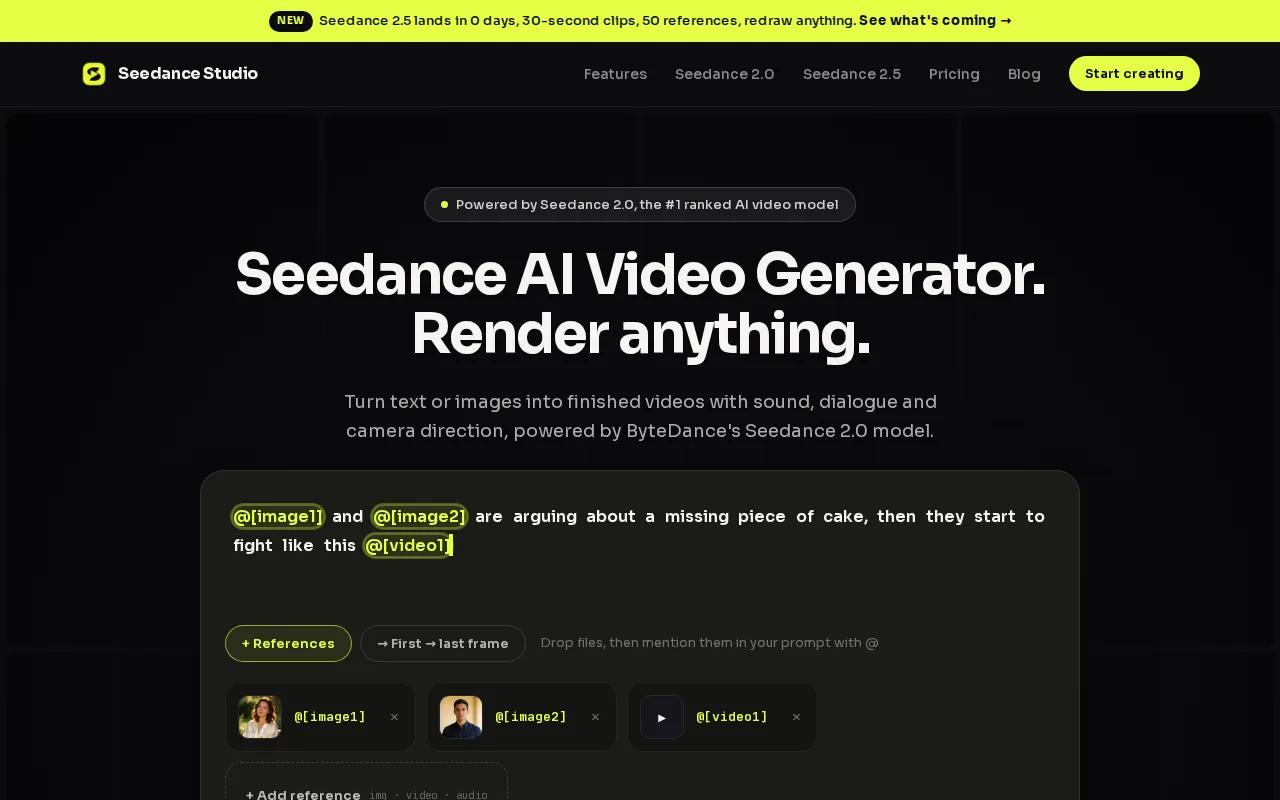
Type a prompt, upload reference images, or add video and audio files. Seedance 2.0 can read those inputs in one generation. That matters when a product team needs the same character, product, or setting to stay consistent across several shots.
We also like the camera control. You can ask for a tracking shot, orbit move, dolly push, handheld feel, or a Hitchcock zoom in plain language. The model can generate native sound too, including dialogue, sound effects, and music that follows the scene.
For teams that need code, the Seedance API for AI Video Generation turns the same model into a REST workflow. Submit a prompt and references, receive a job ID, then poll the job or use a webhook when the MP4 is ready.
Seedance Studio has a free tier, and paid plans start at $14 per month. The app is independent and isn't affiliated with ByteDance. Its main limit is output length, since short-form generation works best when you build a larger piece from several connected clips.
2. OpenAI Sora: Best for realistic physics and cinematic visuals
OpenAI Sora is a strong text to video API choice when motion, space, and lifelike detail matter more than the lowest render cost. It fits product concepts, cinematic ads, and visual tests that need believable movement.
Sora supports video creation from natural language and images. Its API works through asynchronous jobs. A request returns a job ID and status, then your system can poll for changes or wait for a webhook.
That job model is important. A user-facing app shouldn't freeze while a render runs. Store the job ID, show a progress state, and let a webhook trigger the next step when the file is complete.
Sora also supports input images, reusable character assets, video extensions, and focused edits. An extension can continue a finished clip while keeping its motion and camera direction. A focused edit is safer than asking for many changes at once because small changes tend to preserve more of the original shot.
The tradeoff is latency. A render can take several minutes, especially at higher resolution. Download links also expire after a limited period, so your app should copy completed files to its own storage right away.
Choose Sora when visual realism is the brief. Choose another tool when your product needs instant previews at high volume.
3. Runway Gen-3: Best for video editing beyond generation
Runway Gen-3 stands out among text to video API tools because the workflow can extend past a single prompt. It suits creative teams that need to generate a shot, revise footage, or move into a wider editing pipeline.
Runway's product covers image, video, audio, editing, and language models in one workspace. Its tools can generate video from text, images, video, or audio. That gives a team more room to start with a rough idea and shift into edits without changing its whole process.
Model availability can change, so check the live model list before you build around a model name.
For cost planning, Gen-3 costs approximately $0.05 to $0.12 per second of generated video, depending on resolution and features. That price can look low for a short social clip. It can rise quickly when you generate many versions or longer footage.
Runway is a good fit for a studio pipeline that needs more than raw generation. Frame edits, video-to-video work, and model routing can help a team test quality, speed, or cost without rewriting every part of its system.
The caveat is change. Runway adds models and retires older identifiers, so pin versions in production and watch API updates closely. If your main need is a simple prompt-to-MP4 flow, the extra controls may add more work than value.
4. Pika: Best for simple, affordable social video experiments
Pika is a friendly text to video API option for social teams that want quick ideas without a steep learning curve. Its focus is short, expressive video for posts, ads, memes, and product teasers.
Pika accepts a sentence, image, video clip, or audio file. You can animate a still, swap an object, add something to a shot, or turn a portrait into a talking video with lip sync. Those focused tools make it easier to test a creative idea than a broad prompt box can.
The platform is available on the web and iOS, with a free tier to start. Pika offers generation starting at $0.03 per generation, with subscription options. Treat that as a starting point rather than a full campaign budget, since retries and output settings affect total spend.
Pika is especially useful for a social manager who needs ten hooks before lunch. Start with one product image, test several motion ideas, then keep the strongest version for a more polished edit.
The main limit is depth. Pika's playful effects and short-form controls are a strong match for fast experiments, but they may not fit a long, multi-scene production with strict character continuity.
Pick Pika when speed and creative range matter more than a heavy production pipeline. It is a smart first test for a campaign idea that may never need a full-length video.
5. Luma AI: Best for 3D-style shots and camera movement
Luma AI is a good text to video API pick for object-led scenes and controlled camera movement. It fits product reveals, environment shots, and visual concepts where depth is part of the idea.
Its key strength is a 3D-focused approach, with strong performance on object-centric video and camera movement. That makes Luma worth testing when the brief says rotate around an object, move through a space, or show a product from several angles.
For example, a product team might start with a still image of a device. The prompt can ask for a slow orbit, a close push toward one feature, or a pullback that reveals the room. The best results still depend on a clear subject and a simple scene.
Luma's starting cost is around $0.04 to $0.08 per video, based on length and resolution. Confirm the current rate before you set a hard budget, since pricing can differ by access route and output settings.
Luma's caveat is workflow fit. Strong camera movement doesn't automatically solve brand consistency, dialogue, or batch production. If your campaign depends on repeatable characters and native sound, test those needs in a small batch before choosing Luma as the main engine.
Use Luma when the camera is the star of the shot. For a simple social workflow with sound already in the result, Seedance Studio may save you a later production step.
Text to Video API Comparison Table
The cheapest text to video API isn't always the best buy. Automation and integration support can vary more than many buyers expect.
| Tool | Best fit | Workflow strength | Watch for |
|---|---|---|---|
| Seedance Studio | Short-form creator and marketing work | References, camera direction, native sound, browser and API paths | Short clips need to be assembled for longer stories |
| OpenAI Sora | Cinematic realism | Jobs, webhooks, extensions, focused edits | Render time and storage handling |
| Runway Gen-3 | Generation plus editing | Broad creative workflow and model routing | Model names and access can change |
| Pika | Social experiments | Effects, swaps, inserts, and talking portraits | Less suited to long-form continuity |
| Luma AI | Object shots and camera moves | 3D-style scene control | Test audio and batch needs first |
Only a share of the APIs reviewed mention a free trial or free tier, and the data showed a mismatch between marketing language and what counted as a genuine free tier. Test the actual signup flow before you promise free access inside your own product.
Frequently Asked Questions About Text to Video APIs
What is a text to video API?
A text to video API lets software send a written prompt to a video model and receive a generated clip. Most workflows run as jobs rather than instant responses. Your app submits the request, checks its status or listens for a webhook, then downloads the finished file for storage or editing.
Which text to video API is best for beginners?
Seedance Studio is the easiest starting point for beginners who want a browser workflow first. You can type a prompt or upload references without building an integration. When you need automation, the Seedance API gives your team a code path without forcing you to replace the creative workflow.
Are text to video APIs free?
Some text to video API tools mention trials or free tiers, but access rules vary. A free account may limit credits, resolution, clip length, or downloads. Test the full path from signup to usable export before you base a product promise on free generation.
How do video generation APIs return finished files?
Video generation APIs usually return a job ID first, then a later status change. Your system can poll that job or wait for a webhook. Once the render is complete, download the file to your own storage because temporary links may expire.
What should I test before choosing an API?
Test prompt accuracy, character consistency, render time, sound, output size, and retry cost. Then test the workflow with your own assets. A model that looks great in a demo may fail when your app needs batch jobs, webhooks, or repeatable brand references.
Conclusion
Start with Seedance Studio if you need fast, consistent short videos with native sound and a simple path to API automation. Create a free account, run five prompts against your real content brief, and keep the tool that produces usable clips with the fewest retries.